
Extensions and commands
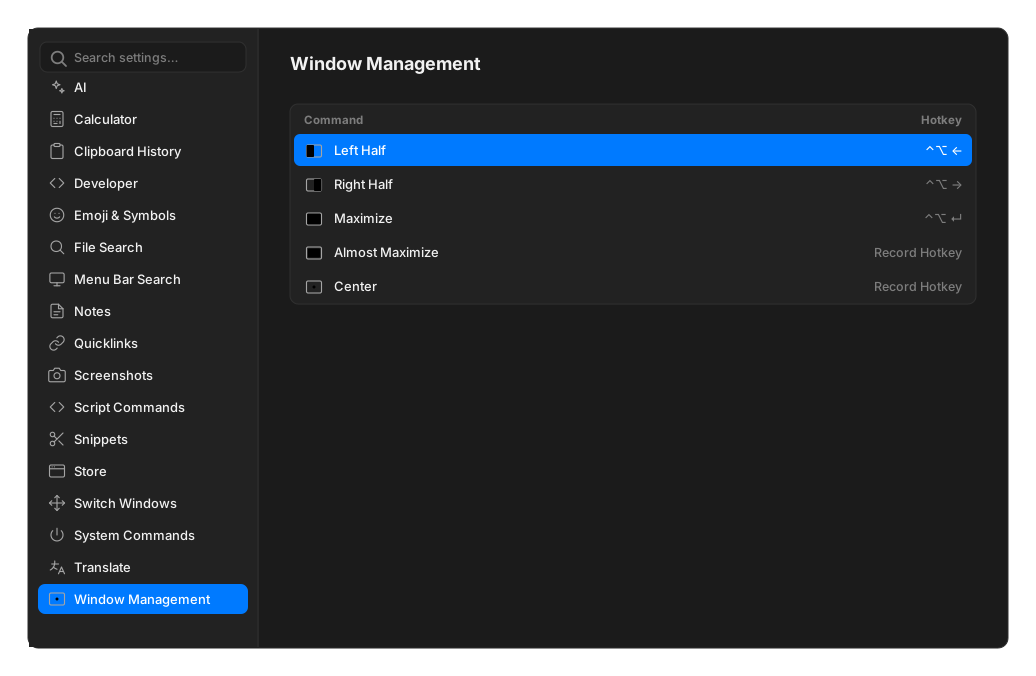
Every extension gets its own entry in the Settings sidebar, showing what it is, its version, where it came from, and a table of its commands.
The command table
Section titled “The command table”| Column | What it does |
|---|---|
| Name | The command |
| Alias | A nickname you type in root search |
| Hotkey | A global shortcut that runs just this command |
| Enabled | Uncheck to hide it from search and unbind its hotkey |
Aliases
Section titled “Aliases”Click Add Alias, type, press ↵. Typing that alias in root search puts the command first, ahead of anything fuzzy matching would suggest.
Aliases must be unique, ignoring case. If one is taken, Settings says so and names the command
holding it by its internal id, something like ext:snippets:search-snippets, rather than by its
title.
Per-command hotkeys
Section titled “Per-command hotkeys”Click Record Hotkey and press the combination. It must include at least one modifier.
If the combination is already used by the palette or another command, Settings names the conflict and refuses it. OpenRay Settings itself cannot take a hotkey, since ⌘, already opens it.
A hotkey is only bound while its command is enabled and still installed. Disabling an extension silently releases its hotkeys, and re-enabling restores them.
A combination the operating system itself will not surrender cannot be caught here — see your platform’s notes for Windows and Linux.
Extension preferences
Section titled “Extension preferences”Extensions can declare their own settings, which appear above the command table. Extension-wide ones sit under General, command-specific ones under that command’s name.
Supported field types are text, password, checkbox, dropdown, application picker, file picker and folder picker. Changes save as you make them — there is no Save button.
If a command needs a preference you have not filled in, running it opens Settings and tells you which one.
Enabling, disabling and removing
Section titled “Enabling, disabling and removing”Each extension has a single toggle for the whole thing. Installed extensions can be uninstalled; built-ins cannot.
Uninstalling deletes the extension’s files and any aliases and hotkeys you assigned to its commands. Data it stored is kept, so reinstalling restores it.
An extension you are developing locally shows Stop Developing and Resume Developing instead, along with its last build result.