
Snippets
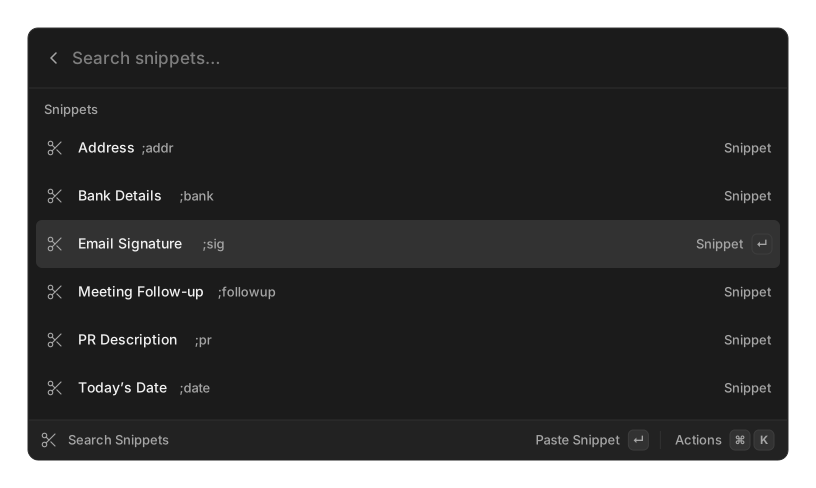
A snippet is a piece of text you paste often. Create one with Create Snippet, find it with Search Snippets, or just type its name in root search and press ↵ to paste it.
Creating a snippet
Section titled “Creating a snippet”| Field | Required | What it is |
|---|---|---|
| Name | yes | What you search for |
| Keyword | no | Also searchable, and the auto-expand trigger |
| Snippet | yes | The text that gets pasted |
Pick a distinctive keyword such as ;sig or ;addr. A short everyday word will fire when
you did not mean it to.
Actions
Section titled “Actions”From Search Snippets: Paste, Copy to Clipboard, Edit, Create Snippet, and Delete (which confirms first).
If a snippet’s text contains {argument}, the list’s search bar turns into a field for that
value before pasting.
Auto-expansion
Section titled “Auto-expansion”With auto-expansion on, typing a snippet’s keyword in any application replaces it in place with the expanded text. Settings → Snippets:
| Setting | Options | Default |
|---|---|---|
| Auto-Expand Snippets | on / off | off |
| Trigger | Instant, After Delimiter | Instant |
Instant expands the moment the keyword is fully typed. After Delimiter waits until you type a space, tab or enter after it, and consumes that delimiter.
Things worth knowing:
- Snippets that take an argument are never auto-expanded. Their keyword still works from the palette.
- A snippet with no keyword is never auto-expanded.
- When two keywords overlap, the longer one wins.
- A snippet using
{selection}briefly copies your current selection while expanding. - Edits take effect within a couple of seconds without a restart.
Platform support
Section titled “Platform support”| Platform | Auto-expansion | Requires |
|---|---|---|
| macOS | yes | Accessibility permission; Input Monitoring is also prompted |
| Windows | yes | nothing extra |
| Linux (X11) | yes | the X server’s XRecord extension |
| Linux (Wayland) | no | not possible — see Linux notes |
When it cannot start, the Snippets settings pane shows a banner explaining why rather than failing silently.
Placeholders
Section titled “Placeholders”Placeholders work in snippets and, with a smaller set, in Quicklinks.
| Placeholder | Expands to | Options |
|---|---|---|
{clipboard} |
The current clipboard text | offset=N is accepted but has no effect today — see below |
{selection} |
Selected text in the frontmost app | |
{argument} |
A value you are prompted for | default="…", name="…" |
{snippet name="…"} |
Another snippet’s text, itself expanded | name= required. Snippets only |
{date} |
A date, default d MMM yyyy |
offset=, format=, locale= |
{time} |
A time, default h:mm a |
offset=, format=, locale= |
{datetime} |
Date, then at, then time |
offset=, format=, locale= |
{day} |
A weekday name, default EEEE |
offset=, format=, locale= |
{uuid} |
A random UUID | |
{cursor} |
Nothing — marks where the caret lands after pasting | |
{calculator expression="…"} |
The result of an expression | expression= required |
A token that cannot be resolved is left in the text exactly as you wrote it, so a typo is visible rather than silently dropped.
Date and time options
Section titled “Date and time options”offset= takes space-separated terms, each a sign, a number and a unit letter: y years,
M months, d days, h hours, m minutes.
{date offset="+2y +5M -3d"}{time offset="+90m" format="HH:mm"}{day offset="+1d"}Month arithmetic clamps to the target month’s last day, so 31 January plus one month is 28 or 29 February.
format= accepts yyyy yy MMMM MMM MM M dd d EEEE EEE E HH H hh h mm m ss s SSS a. Text in
single quotes passes through literally. locale= takes a tag such as fr-FR and changes
month and weekday names.
Modifiers
Section titled “Modifiers”Chain modifiers after a |, applied left to right.
| Modifier | Effect |
|---|---|
uppercase |
Upper-cases the value |
lowercase |
Lower-cases the value |
trim |
Strips surrounding whitespace |
percent-encode |
Escapes it for a URL |
json-stringify |
Quotes and escapes it as JSON |
raw |
Opts out of the caller’s own escaping |
{clipboard | trim | uppercase}{argument name="repo" | percent-encode}Related
Section titled “Related”- Quicklinks — the same placeholder engine, in URLs
- Clipboard History — where
{clipboard offset=N}reads from