
Screenshots
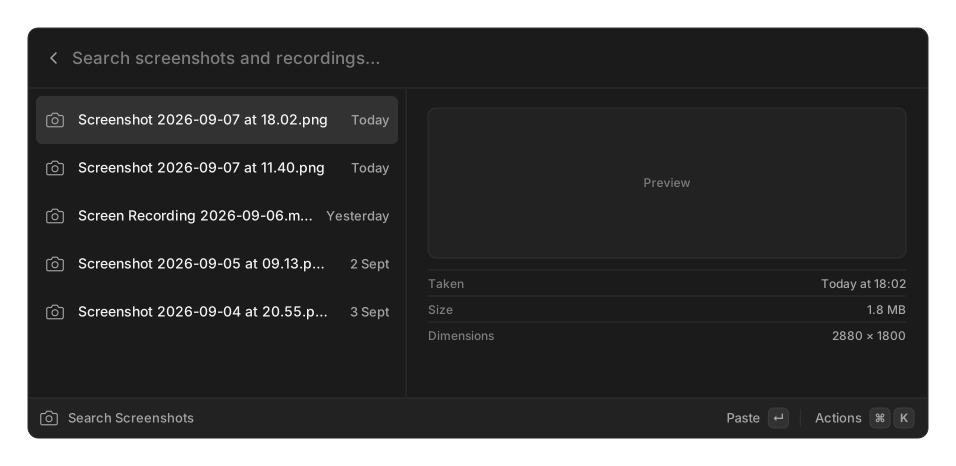
Once at least one search scope is configured, two rows appear in root search: Search Screenshots and Paste Latest Screenshot. A third, Drop Latest Screenshot, appears only where dragging is possible, which is Linux on X11.
Default scopes are ~/Desktop on macOS and ~/Pictures/Screenshots on Windows and Linux.
Searching
Section titled “Searching”The grid supports three prefixes:
| Query | Finds |
|---|---|
name:invoice |
Files whose name contains it |
text:invoice |
Files whose contents contain it, via text recognition |
date:today, date:yesterday, date:2026-09-07 |
Files from that day |
A bare word matches the name or the recognised text. The dropdown filters to All, Images or Videos.
Text recognition
Section titled “Text recognition”| Platform | Engine | Available |
|---|---|---|
| macOS | Vision | always |
| Windows | Windows OCR | with a suitable language pack installed |
| Linux | Tesseract | when the tesseract binary is on your PATH |
Recognition runs in the background, and each pass works through a limited batch: up to 500 images are read for text and up to 200 videos get a thumbnail. With a large folder it takes several passes before everything is searchable by its text.
The settings pane names the engine it found, or tells you to install Tesseract.
Actions
Section titled “Actions”Paste uses your default format. Copy as Auto / Image / File / Path each force one. Open hands the file to your system. Pin exempts a file from the automatic cleanup below. Drop at Cursor drags the file into whatever is under the mouse pointer.
Auto offers the image pixels, a file reference and the path all at once, so an image editor gets pixels and a text editor gets the path. Videos cannot be copied as an image, and fall back to a file reference.
Drop at Cursor is Linux X11 only. macOS and Windows need a live drag gesture, which cannot be synthesised.
Settings
Section titled “Settings”| Setting | Options | Default |
|---|---|---|
| Search Scopes | folders | ~/Desktop on macOS, ~/Pictures/Screenshots elsewhere |
| Video Extensions | extensions without a dot | mp4, mov, webm |
| Storage Duration | Unlimited, 1 Day, 1 Week, 1 Month, 3 Months, 6 Months, 1 Year | Unlimited |
| Grid Columns | 3, 4, 5, 6 | 4 |
| Default Paste Format | Auto, Image, File, Path | Auto |
| Search Screenshot Text | on / off | on |
Storage Duration moves older screenshots to the trash, once a day, never deleting them outright. Pinned files are never touched.