
Quicklinks
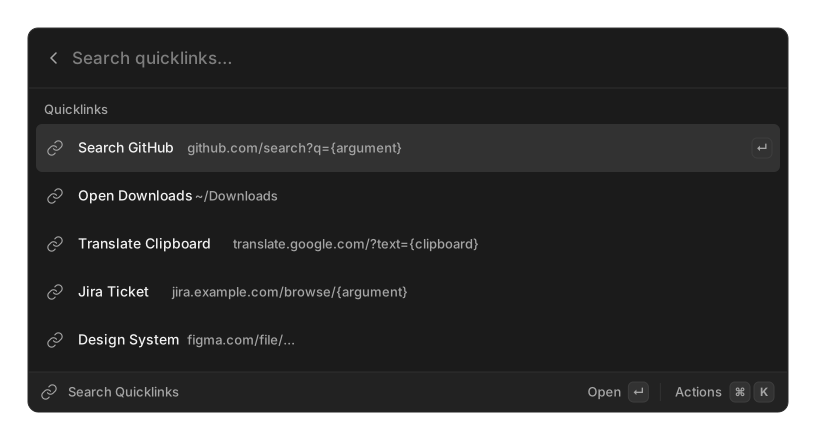
A quicklink is a saved link with a hole in it. Type its name in root search, type a value, press ↵, and it opens.
Creating one
Section titled “Creating one”| Field | Example |
|---|---|
| Title | Search GitHub |
| URL or Path | https://github.com/search?q={query} |
Both are required. There is no icon field — a quicklink uses the default icon.
What a target can be
Section titled “What a target can be”| You write | It opens |
|---|---|
https://… or any scheme:// |
as-is |
mailto:…, tel:… |
as-is |
/Users/you/Documents |
that file or folder |
~/Downloads |
that file or folder, home expanded |
github.com |
https://github.com |
Nothing checks that a file or folder actually exists, so a typo opens nothing.
You cannot choose which application opens a quicklink. It goes to whatever your system has registered for that URL or file type.
Placeholders
Section titled “Placeholders”{query} is the simple form: whatever you type replaces it, URL-escaped.
{argument} is the same idea with options, and {clipboard}, {selection}, {date},
{time}, {datetime}, {day} and {uuid} all work too. Every value is percent-encoded
for you unless you add | raw.
https://github.com/search?q={query}https://jira.example.com/browse/{argument name="ticket"}https://translate.google.com/?text={clipboard}https://example.com/notes/{date format="yyyy-MM-dd"}Two placeholders from the Snippets reference do
not work here: {snippet name="…"} and {cursor}. Both are left in the URL verbatim.
Actions
Section titled “Actions”Open (which prompts for the value first), Copy Link (the raw template, unexpanded), Edit, Create Quicklink, and Delete.
Related
Section titled “Related”- Snippets — the full placeholder reference
- Core concepts