
File Search
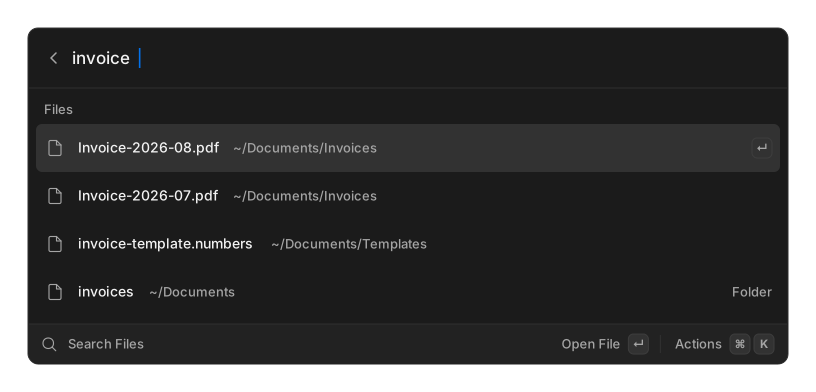
Search Files stays hidden until you add a folder. Settings → File Search → Search Scopes, then add the folders worth indexing — your projects directory, your documents, whatever you actually search.
How it works
Section titled “How it works”OpenRay keeps its own index. A background sweep walks your scopes and records file names and modification times; searching matches fuzzily against that index and never touches the disk, so results are instant.
The first sweep after adding a folder is the slow one. Until it finishes you will see No Files Indexed Yet with a note that indexing is running.
This is filename search only. There is no content or full-text search. Results are capped at 200.
What the index skips
Section titled “What the index skips”The sweep uses the same ignore rules a developer tool would. It skips hidden files, and it
honours .gitignore, .ignore and your global git excludes.
That is usually what you want in a projects folder, since build output and dependency directories stay out of the way. It also means files you deliberately gitignored will not be found, and neither will dotfiles. If you are searching a folder where that matters, expect gaps.
Actions
Section titled “Actions”| Action | What it does |
|---|---|
| Open | Opens the file with your system’s default handler |
| Reveal in Files | Shows it in your file manager |
| Copy Path | Copies the full path |
| Open in Terminal | Opens a terminal in the file’s folder |
Open in Terminal uses iTerm on macOS when installed, otherwise Terminal. On Linux it tries
$TERMINAL, then x-terminal-emulator, gnome-terminal, konsole, alacritty, kitty
and xterm. It is not supported on Windows.
Related
Section titled “Related”- Screenshots — a separate, image-aware index
- Quicklinks — for a folder you open constantly