
Clipboard History
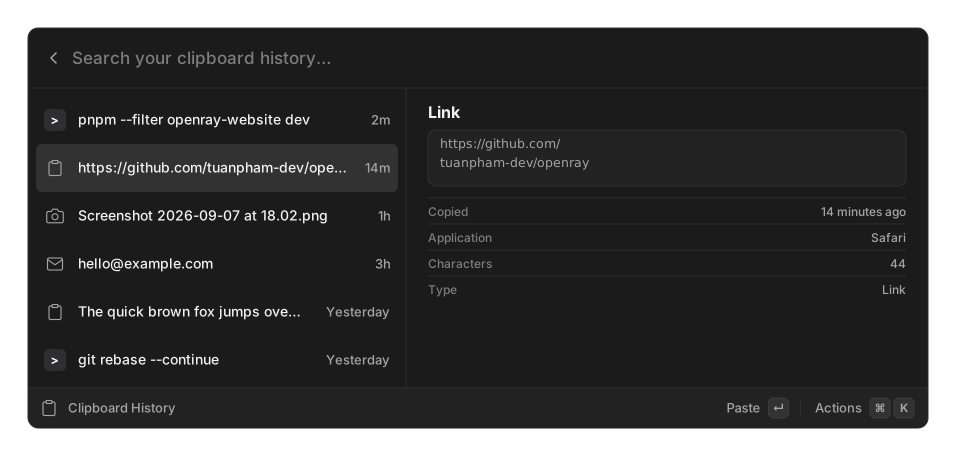
Type Clipboard History in the palette to search everything you have copied — text, files, and images. Results are grouped into Today, Yesterday, This Week, This Month and Older.
Filtering
Section titled “Filtering”The dropdown in the search bar filters by type: All Types, Text, Images, Files, Links,
Colors, Emails, Numbers. The type is worked out from the content itself, so a copied
#6236FF shows up under Colors and a copied address under Emails.
Actions
Section titled “Actions”| Action | Shortcut | Available for |
|---|---|---|
| Paste | ↵ | every entry |
| Copy | ⌘C | everything except images |
| Open in Browser | links | |
| Open File | files | |
| Compose Email | email addresses | |
| Copy as HEX / Copy as RGB | colors | |
| Delete | ⌘⌫ | every entry |
| Clear All | ⌘⇧⌫ | every entry |
Delete and Clear All both ask for confirmation first.
The detail pane shows what fits the entry: dimensions, file size and path for an image; the host for a link; character and word counts for text; and the type and copy time for everything.
Settings
Section titled “Settings”Under Settings → Clipboard History:
| Setting | Options | Default |
|---|---|---|
| Retention | Never, 1 Day, 1 Week, 1 Month, 3 Months, 6 Months, 1 Year | Never |
| Maximum Entries | 100 to 10,000 | 1,000 |
| Maximum Image Size | 4 to 256 MB | 64 MB |
Both limits apply together: an entry is dropped when it falls past the entry cap or past the retention cutoff, whichever comes first. Deleting an image entry deletes its backing file too.
Copying the same thing twice does not create a duplicate — it moves the existing entry back to the top. Empty and whitespace-only copies are never recorded.
Privacy
Section titled “Privacy”On macOS, OpenRay honours the standard pasteboard markers password managers use
(org.nspasteboard.ConcealedType and its siblings). A copy marked that way is not recorded
at all.
On Windows and Linux there is no such exclusion — the equivalent platform mechanism is not implemented, so anything you copy from a password manager will land in history on those platforms. Clear the entry afterwards, or turn the extension off while you work with secrets.
Extensions can also mark their own copies as concealed, and the clipboard save/restore around snippet auto-expansion is suppressed from history.
The watcher only runs while this extension is enabled. Disable it in Settings and nothing is recorded.
Related
Section titled “Related”- Snippets
- Import / Export — clipboard text can travel; images stay on the machine