
OpenRay documentation
OpenRay is a keyboard launcher for macOS, Windows and Linux. One hotkey, one search box, and everything behind it: your applications, your clipboard history, your snippets, window management, AI, and whatever you install.
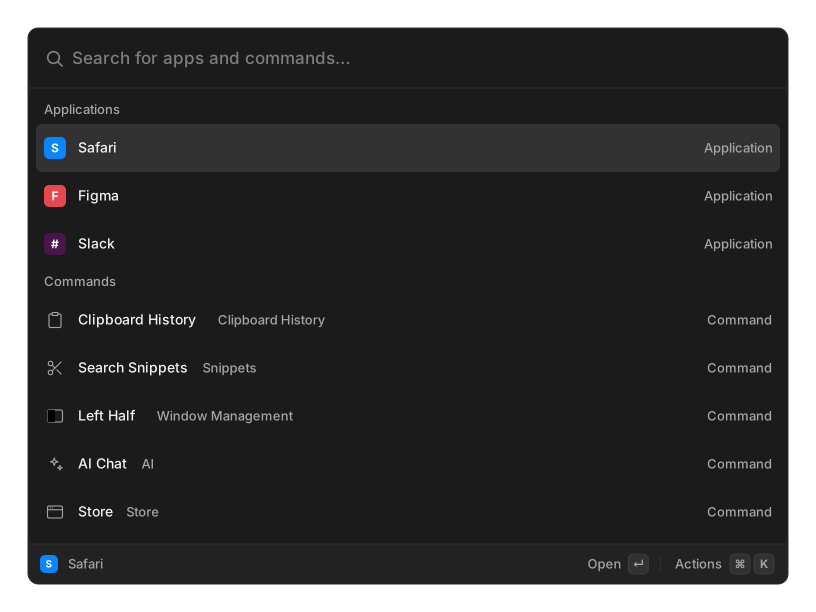
Start here
Section titled “Start here”- Install — download it and get the hotkey working
- First run — the Spotlight conflict, and the permissions paste needs
- Core concepts — search, commands, actions, aliases
- Keyboard shortcuts — every key the palette handles
What ships in the box
Section titled “What ships in the box”Everything below except application search is an extension, running on the same runtime a third-party extension uses.
| Application search | Launch anything installed |
| Calculator | Answers as you type |
| Clipboard History | Everything you have copied |
| Snippets | Reusable text, expanded as you type |
| Quicklinks | Links with a value dropped in |
| Window Management | 35 tiling presets |
| Switch Windows | Jump to any open window |
| System Commands | Lock, sleep, volume, media |
| Script Commands | Your own scripts as commands |
| Emoji & Symbols | Search by name, paste anywhere |
| File Search | Find files by name |
| Screenshots | Search them by their text |
| Notes | A floating markdown scratchpad |
| Translate | 109 languages, no API key |
| Menu Bar Search | Trigger any menu item by name |
| AI | Chat, commands, agents, MCP tools |
Go further
Section titled “Go further”- The Store — install more from any registry you trust
- Settings — hotkey, appearance, aliases, import and export
- Platform notes — what differs on macOS, Windows and Linux
- Writing an extension — build your own
- FAQ — the things that go wrong first
OpenRay is MIT-licensed and developed in the open at github.com/tuanpham-dev/openray.